
Choosing the best software for image retouching techniques is important for both professional photographers and hobbyists. With many options available today, knowing which tools provide the best features, ease of use, and value can greatly affect your editing process and final images. This guide to the best software for image retouching techniques will help you find options suitable for beginners as well as advanced users. Whether you need professional capabilities or easy-to-use tools, this guide covers the best software for image retouching techniques in 2025.
Image retouching software has evolved, with top tools like Adobe Photoshop and new options improving constantly. This guide reviews the best image retouching software in 2025 to help you choose the right one.
Key Takeaways
- Because they have many advanced features and functions, Adobe Photoshop, Adobe Lightroom and Capture One Pro are the best software for professional photo editing.
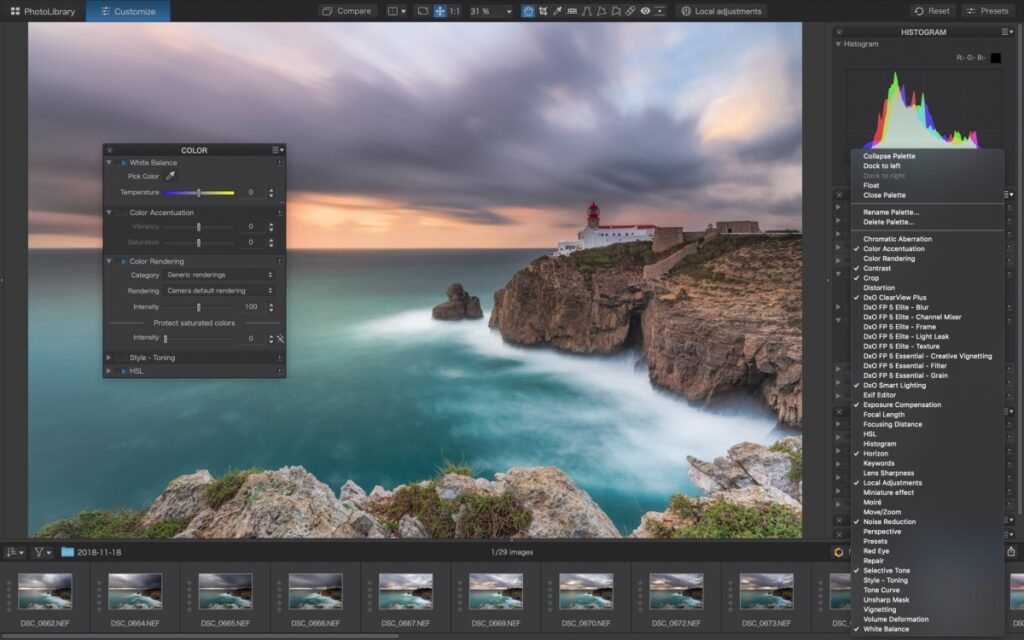
- DxO PhotoLab has powerful tools for raw file processing and noise removal, great for improving photo quality.
- Core PaintShop Pro is a great choice for beginners and intermediate users because it is both affordable and useful.
- Skylum Luminar Neo and CyberLink PhotoDirector are two new AI-powered tools that make editing fast and easy.
- If you just want to make simple changes and don’t want to pay for expensive software, check out free image editing programs like GIMP and Paint.NET.
- When looking for the best software for photo retouching, put features that meet your editing needs and skill level at the top of your list.
Best Software for Image Retouching Techniques for Beginners
Beginners do well with easy-to-use software that isn’t too complicated. Look for programs with simple guides, ready-made filters, and easy steps to help new users get good results fast without needing a lot of skill. If you want to save money, programs like Affinity Photo or free options work well. They give great results without costing much or needing a subscription.
Best Software for Image Retouching Techniques: Professional Grade Tools
Professional photographers and graphic designers prefer image editing programs that are known for having many advanced features and functions. These choices for professional photo workflow software include advanced editing tools that let you make precise changes.
Professional workflows require software that handles complex retouching, batch processing, and integrates with other tools, supporting RAW files and advanced color control.
Choosing Best Image Retouching Software: Balancing Features and Usability
It’s important to find the best balance between great photo editing tools and ease of use for users of all skill levels. Choosing software that strikes this balance will ensure workflows run smoothly without reducing the quality of changes made.
When choosing a major photo editor, you should think about how to fix the image, what kind of editing you will need to do, and how long it generally takes to complete the job. This makes it easy to pick software that suits your desires and tastes.
Adobe Photoshop
Advanced Features
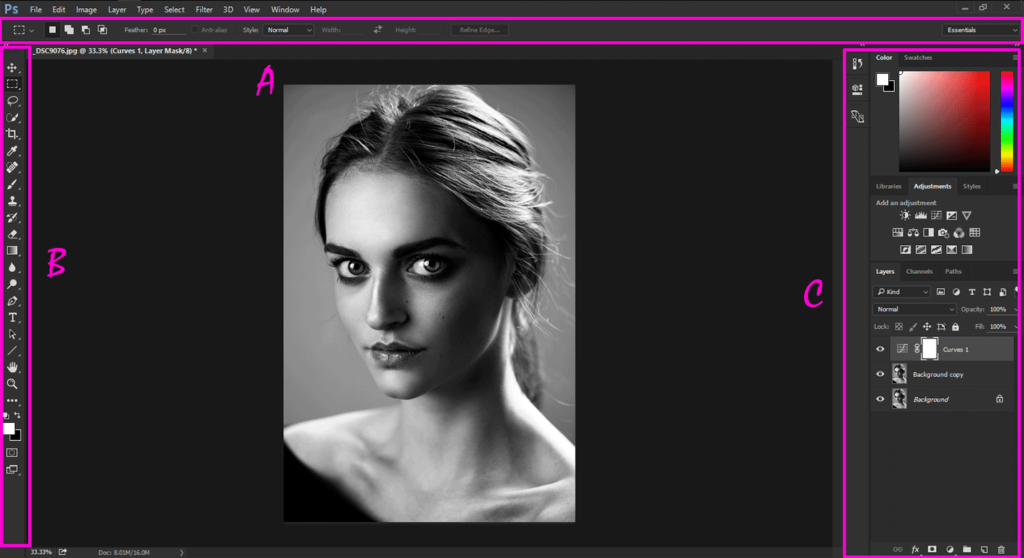
Adobe Photoshop has advanced tools like layers and masks that allow users to modify images in very specific ways. Layers allow users to work on different parts of an image separately, allowing them to make very precise changes. Masking, on the other hand, allows you to make edits that look natural by applying changes to specific areas.
Versatility for Users
Photoshop is useful for many people, from professional shooters to hobbyists, because it can be used in so many different ways. The program comes with many tools and features that can be used for various photo editing tasks. Photoshop has all the tools you need to make any kind of change to an image, from minor tweaks to full transformations.
Best Image Editing Software with AI-Powered Tools
One of the best things about Adobe Photoshop is that it has AI-powered tools that make editing faster and easier. These tools use artificial intelligence to automate certain tasks, saving humans time and effort. AI can help pick out objects, get rid of backgrounds, and even recognize faces to fix images
Adobe Lightroom
Streamlined Workflow in Photo Retouching Software
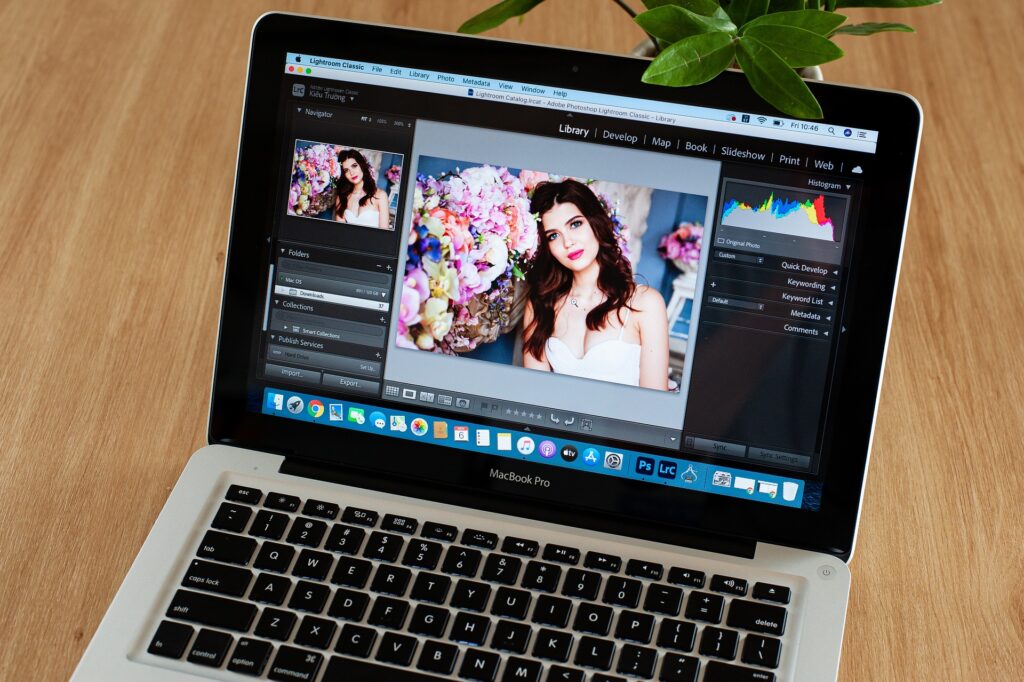
Organizing and enhancing photos is easy with Adobe Lightroom‘s streamlined workflow Users can easily add, organize and control their photos in one place, which makes updating easy. With tools like Photo Workflow Management, users can easily move from one task to another.
The program’s lighting and camera tools allow users to make precise changes that improve the quality of their photos overall. Photographers can easily get results that look like they were taken by a professional by using tools like darktable and lens adjustments. Support for raw camera files ensures that users can edit high-quality image files.
Cloud Storage Integration
One of the best things about Adobe Lightroom is that it works with cloud storage, so users can view their work from anywhere. Photographers who need to modify and share their work on the go will love this feature. Cloud storage makes it easy for people to work together and share their portfolios online.
- It makes it easy to get photos from different devices
- It makes it easy to share updated photos with clients or colleagues
Easy-to-Use Interface in Professional Photo Retouching Software
Adobe Lightroom has an interface that is easy to use for both serious amateurs and professionals. It is easy for users to switch between editing tools and features because the software is designed in a way that makes sense No matter how much you know about photo editing or how new you are to it, Lightroom has a lot of options for you.
- The simple format makes it attractive to a wide group of users.
- Professional photographers can use it to do advanced editing
Capture One Pro
Color Grading
Capture One Pro excels at robust color grading, allowing users to make small changes to photos that look great. Its advanced tools make it easy for professionals to give their shots the look they want.
Photographers really like the software’s color grading features, which allow them to make a lot of changes to make their images look better People can change the hue, saturation, and amount of luminance to create beautiful, bright images.
Best Photo Retouching Software with Tethering Capabilities
Capture One Pro has great tethering features for studio photographers who need to have precise control over their photos. With this feature, photographers can connect their camera directly to the software, allowing them to view and modify images in real time.
With tethered shooting, shooters can instantly view and rate photos on a big screen, making sure they get every detail. Professionals who want high-quality results from their work need this feature badly.
Customizable Workspace in Image Retouching Software
Capture One Pro has an area that can be changed to suit your needs, making overall editing easier. The structure of the interface can be changed so that users can easily access the most important tools and features.
The software’s flexible interface allows users to maximize their process, which speeds up and improves editing. If their setup is based on the needs of the user, photographers can concentrate on improving their images without distraction.
DxO PhotoLab: Professional Image Retouching Software for Advanced Editing
Best Photo Editing Software with Advanced Noise Reduction
DxO PhotoLab has best-in-class noise reduction technology, so your photos will be clear and free of any visual clutter. This advanced function improves the quality of all your photos
Professional Image Editing with Lens Profile Corrections
The software allows you to make corrections based on the lens profile, which makes your photo editing results better. You can make precise changes to each image using different camera profiles.
Industry Recognition
DxO PhotoLab has earned industry recognition for its superior optical quality enhancement algorithms. The software is widely used by professional photographers who value its scientific approach to image processing, particularly for challenging lighting conditions and specialized lens corrections that other software cannot replicate.
Corel PaintShop Pro
Best Budget-Friendly Photo Retouching Software Option
Corel PaintShopPro stands out as a cheaper alternative to Adobe products because of its powerful features but lower cost Users can use editing tools that are good enough for professionals without spending a lot of money.
Comprehensive Editing Tools
Corel PaintShop Pro offers a comprehensive suite of editing capabilities that rival professional-grade software at a fraction of the cost. The user interface is intuitive enough for beginners yet powerful enough for experienced editors who need advanced functionality.
Best Photo Editing Software with Creative Filters and Effects
One of the great things about Corel PaintShop Pro is that it comes with creative layers and effects that allow users to express themselves more artistically. The program gives you many options for creative projects. You can use brushes to add different textures and try style transfer and color manipulation.
Skylum Luminar Neo: Best AI-Powered Image Retouching Software

Best Image Retouching Software with Innovative AI Tools
Skylum’s Luminar Neo stands out because it has creative AI tools that change the way we fix photos. These tools simplify complex editing tasks using advanced algorithms This makes the process quick and easy.
Users can obtain results with little effort thanks to the software’s inventive AI features. For example, AI-powered templates change settings based on what’s in the image, so users can enhance their images with just a few clicks.
Non-Destructive Image Retouching Software for Creative Freedom
Skylum Luminar Neo puts artistic freedom first by focusing on editing without destroying the original file. This function ensures that users can try different editing methods without hurting the original image quality. Editors can try different styles and effects without limit as long as they keep the original file.
Users can go back and make changes to their edits at any time, including non-destructive editing. This freedom is especially helpful for photographers and graphic artists who want to make small changes to their work repeatedly to get the best results every time.
User-Friendly Interface
One of the best things about Lumina Neo is that it has an easy-to-use interface designed for both new and experienced users. New users can quickly learn how to use the most important editing tools thanks to styles and navigation that are easy to understand.
The program includes tutorials and guided workflows for beginners to help them learn the most important retouching skills. On the other hand, advanced features and customization options can help creative projects become better for editors with more experience.
CyberLink PhotoDirector: Best Complete Photo Retouching Software Suite
Simplified Photo Retouching Workflow Management
CyberLink PhotoDirector combines editing and task management tools in a way that simplifies the entire process of photo retouching. It is easy for users to move between different stages of editing.
The software’s easy-to-use interface allows users to organize their projects well, from adding images to exporting. The software is designed to be used by anyone, so even beginners can quickly learn how it works
Best Photo Retouching Software with Unique Creative Effects
PhotoDirector has tons of creative effects and choices that make it stand out from other programs. With artistic effects and advanced editing tools, users can play with their photos and make them look better in creative ways.
Users can try different ways to get artistic by adding textures, changing lighting effects, and making professional-level enhancements. With these features, photographers can easily improve their work and get amazing results.
Affordability and Value
One of the great things about CyberLink PhotoDirector is that it is cheap and good value for money. Although the software has everything you need for photo editing, it is still affordable enough that many people can use it.
For photographers seeking a powerful editing tool at an affordable price, PhotoDirector is an excellent option. Besides its reasonable price, the software has many features that make it a good choice for both beginners and experts.
Best Free Image Retouching Software: No-Cost Editing Tools & Techniques
Most Popular Free Photo Editing and Retouching Tools
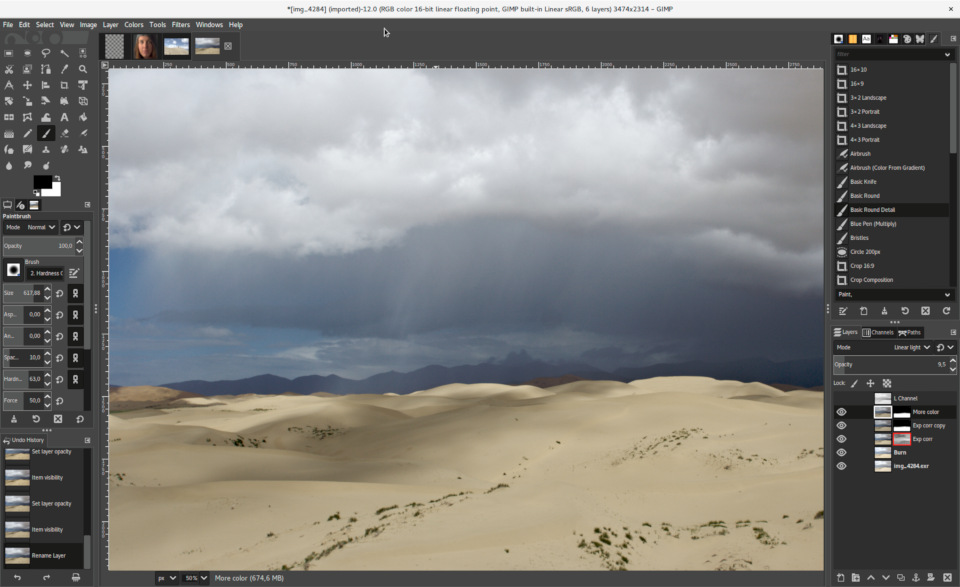
There are many ways to edit photos with free apps and online editors. GIMP, Paint.NET, and Pixlr are all well-known tools. There is no cost to using these tools for simple retouching. Users can easily enhance photos by changing color, brightness and contrast and adding effects.
- GIMP
- Paint.NET
- Pixlr
Limitations of Free Tools
Free image editors are useful, but they are not as good as paid software when it comes to certain features. They may not have advanced features such as text editors, image editing tools or the ability to work with raw images. It is possible that free tools do not have the same customer service or modifications as paid software
Best Beginner-Friendly Photo Retouching Software: Accessibility for Learners
Since these tools are free, they’re perfect for people who are new to photo editing or just want to try it out Their design is easy to use, and their tools are simple and easy to find your way around. Beginners don’t need to buy expensive software to try out different features and methods. This makes it easy for savvy photo editors to try their creativity without worrying about money.
How to Choose the Best Image Retouching Software for Your Needs
Assess Your Photo Editing Needs and Skill Level
Users should think about their needs and skill level before choosing photo retouching software. Determining what each person needs helps you choose the best program.
It’s important to think about whether the program has features that will help you get the editing results you want. Basic editing tools and an easy-to-use interface are important for beginners, while professionals may need more complex features like layers and masks.
Test Image Retouching Software with Free Trial Versions
It is very important to choose the trial version. For this reason, users can try out the program before deciding to buy it. Users can find out how easy it is to use, how well it works, and how well it fits their process by trying trial versions.
Using trial versions of various programs allows users to make smart choices based on real-life experience. This hands-on approach helps them figure out which editing software best fits their needs.
Long-Term Value of Best Photo Retouching Software Investment
Buying image editing software that helps you reach your personal or business goals will pay off in the long run. Good-quality software is constantly updated so that it works with new technologies and industry standards.
For long-term success, it’s important to choose software that allows you to learn and improve your photo editing skills. With the right program, you can be more productive, creative, and efficient, which will help you edit work better.
Making Your Final Software Decision
The software recommendations above represent the most versatile and capable options available in 2025. Start by identifying your primary use case—whether that’s batch editing, creative retouching, or learning the craft—then prioritize the features most relevant to your workflow. Many users find success by starting with a free option to learn fundamentals, then upgrading to professional software as their skills advance and requirements become more specialized.
Complete Guide to the Best Image Retouching Software & Techniques
Best Software for Photo Editing
The list below provides a quick comparison of key tools by category, helping you identify which options align with your specific needs and preferences based on your skill level and budget constraints.
- Adobe Photoshop: The star of the industry with a wide range of editing tools. There are many complex filters, layers, and masks to choose from.
- Adobe Lightroom: Great for processing and changing colors on multiple photos at once; works well with Photoshop to improve workflow.
- Capture One is known for having great color editing tools and is best for tethered shooting, which makes it ideal for studio work.
- Affinity Photo: A powerful alternative to Photoshop that doesn’t cost a lot of money. Allows for an endless number of layers and advanced selection tools.
- GIMP: This is a free, open-source program that can be modified in many ways. It offers a lot of tools to make things work better.
- Corel PaintShop Pro: This program lets you edit photos and create graphics. It comes with AI-powered tools for quick improvements.
- Skylum Luminar AI: This program uses AI to make editing quick and easy. There are artistic filters and one-click enhancements.
- Photopea is a web-based designer that works similarly to Photoshop. There’s no installation required, so you can make quick changes on the go.
If you choose the right image retouching software, you can hone your editing skills and make your photos look better.
Final Remarks: Mastering the Best Image Retouching Software Techniques
Choosing the right program is very important if you want to improve your photos. Adobe Photoshop, Lightroom, and the other tools we’ve talked about have their own features that make them useful for different types of editing. When choosing the one that’s best for you, think about what you need and how skilled you are.
Free tools can also be very helpful when you are editing, as they give you good results at no cost Always remember that the best program is the one that allows you to be creative and achieve your goals easily.
Check out the highlighted software, try them out and find the best one for your photo editing needs Watch your editing skills improve as you continue to practice and try out new tools With the right tools and your creative vision, you can create beautiful works of art. Edit, learn and unleash your creative ideas!
Frequently Asked Questions About Best Photo Editing & Retouching Software
What are the most important things to look for in photo editing software?
When choosing picture retouching software, you should consider how easy it is to use, what editing tools are available, whether it works with your device, how much it costs, how good the customer service is, and how often it gets updated with new features.
Which software is best for people just starting to edit photos?
Adobe Lightroom and Corel PaintShop Pro are beginner-friendly with simple interfaces and guides. Free tools like GIMP and Pixlr work if you know them, but paid software offers more advanced features and support.
How does Adobe Photoshop differ from other photo editing programs?
People know Adobe Photoshop as a powerful program with many editing options, advanced image editing and composing tools, lots of plugin support, and the ability to work with other Adobe Creative Cloud apps.
What makes Adobe Lightroom and Capture One Pro different when it comes to
photo editing?
Adobe Lightroom focuses on streamlining workflow and organization with cloud storage options. On the other hand, Capture One Pro is popular among professional photographers because it excels in color correction and tethered shooting.